Export session
Exporting a session could be useful if you want to save or share a replay, or if you need to have data in a csv format to import them in Excel for example.
Export a session
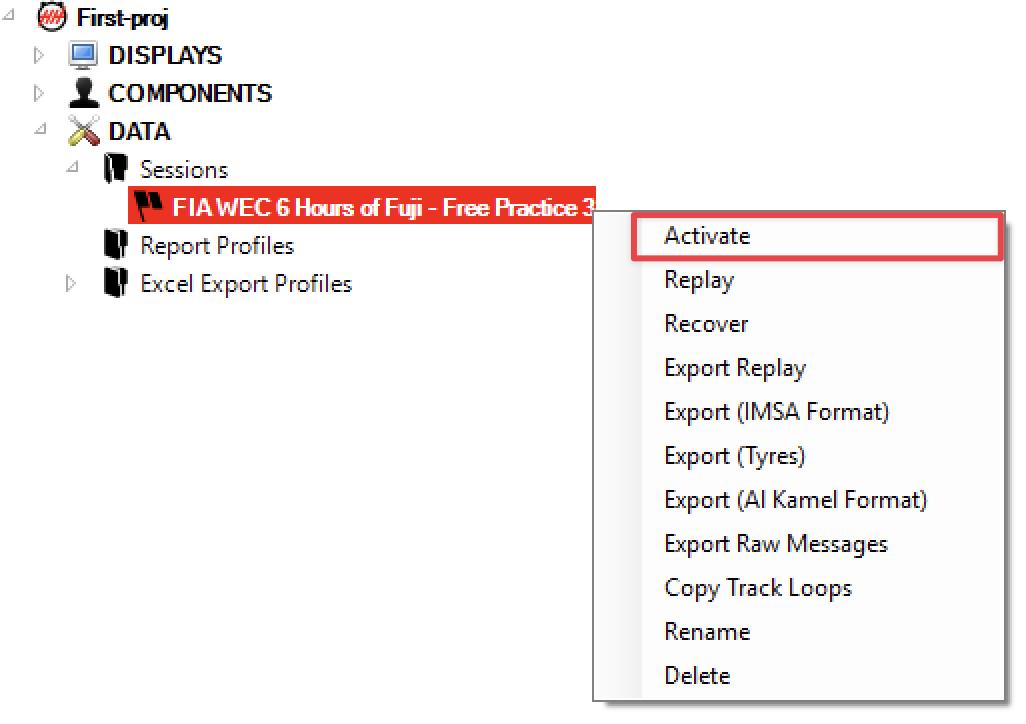
To export a session, you need to do a right click on a session in the tree, and then select one of the export option:

Export Replay
It will export a file you will be able to replayed on another computer or in another project (you will need to select the same protocol).
Export (IMSA Format)
It will export a CSV file with the same columns than CSVs provided by IMSA.
Export (Tyres)
It will export a CSV file with the same columns than CSVs provided by IMSA with an additional column "Tyres".
Export (Telemetry)
It will export a CSV file with the same columns than CSVs provided by IMSA with additional columns for the telemetry-derived lap values: "Energy Remaining", "Energy Consumed" and "Energy Refill Time".
Export (Supercars Format)
It will export a CSV file with the same columns than the IMSA format plus two columns after "Location": "Kerb Hops" and "Shortcuts", True when at least one such track limits warning was reported on the lap (Natsoft XML feed), otherwise False.
Export (Al Kamel Format)
It will export a CSV file with the same columns than CSVs provided by Alkamel in WEC/ELMS/AsLMS.
Export Raw Messages
It will export in a file all messages received by the software. It can be useful to check if you have received all the expected messages.
Export Session Data (JSON)
This feature allows you to export session data (cars, laps, stints, flag segments) to a JSON file for use in external tools or custom analysis.
To open the Session Data Export, click the Export JSON button in the Export group of the Data ribbon tab:

This will open a Session Data Export worksheet. From there:
- Click Browse... to select the destination file path.
- Right-click on the session in the tree and click Activate to load the session data into the export worksheet.
- Click Export to JSON in the ribbon to perform the export.
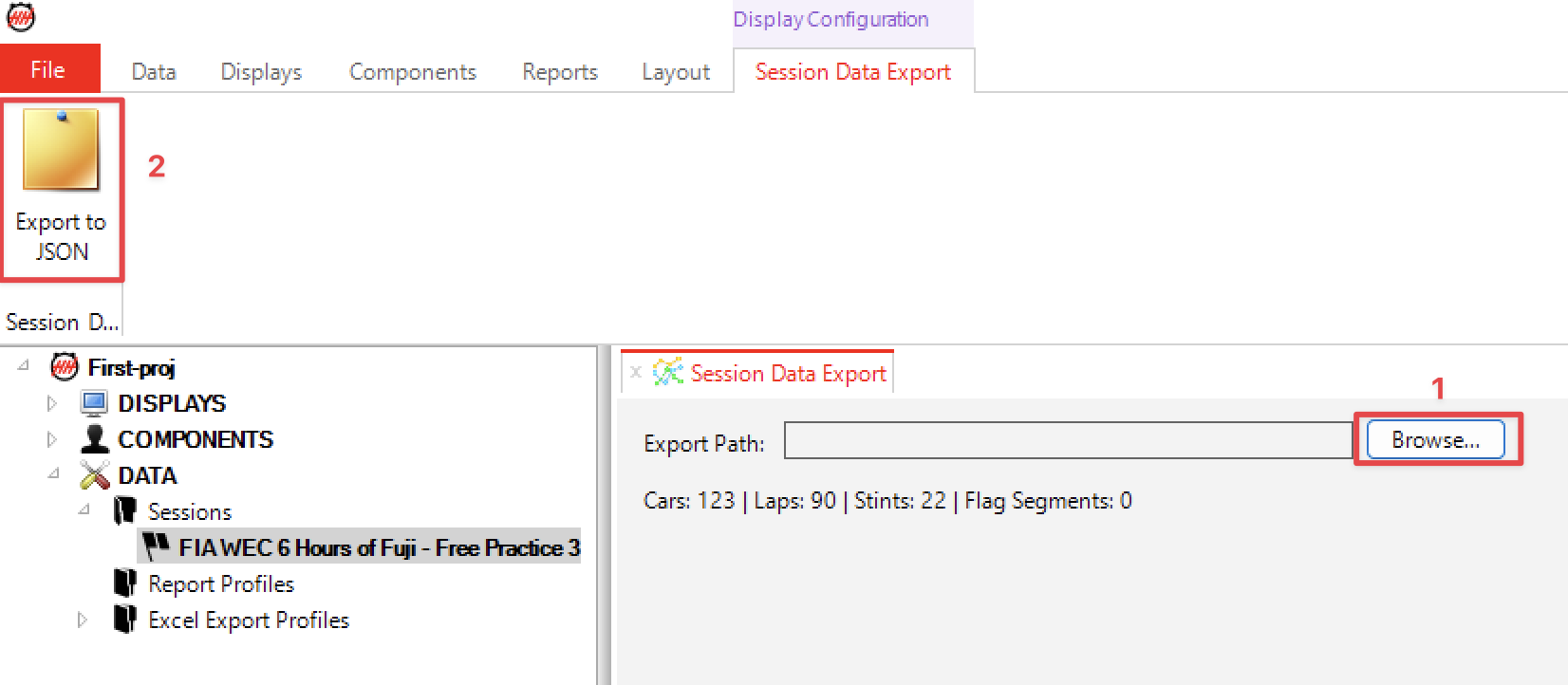
The status bar at the bottom of the worksheet displays the number of cars, laps, stints, and flag segments currently loaded.
Each lap also carries a NumericTags object holding the telemetry-derived lap values, using the same names shown elsewhere in the software: Energy Remaining, Energy Consumed, Energy Refill Time and Remaining P2P. Only the tags the timing feed actually supplied are present, so the object is empty for sessions with no telemetry.
Auto Replay Export
The Auto Replay Export feature automatically saves a .hhreplay file for each session as soon as a new session starts. This is useful at events where sessions follow one another quickly and you want every replay captured without manual intervention.
To open the Auto Replay Export worksheet, click the Auto Replay Export button in the Data ribbon tab.

Setup
- Click Browse... to choose the folder where replay files will be saved. The folder will be created automatically if it does not exist.
- Click Start to activate automatic export.

The status label turns green and reads Active — replays will be exported on session switch.
How it works
Whenever a new session is detected, the software exports the previous session in the background:
- If a pre-built
.hhreplayfile already exists on disk for that session it is copied directly to the destination folder. - Otherwise the replay is regenerated from the project database using the raw message export.
The exported file is named after the session (invalid filename characters are replaced with underscores).
The status label updates after each export to show the filename and time of the last successful export, or an error message if the export failed.

Stopping
Click Stop to deactivate automatic export. Closing the worksheet tab also stops the export. Any replays already exported remain in the destination folder.