Strategy Parameters
The strategy parameters describe the race, the pit stops and the strategy of each car. The Strategy Overview and the race calculations use them. Open them with Strategy in the Configuration group of the Components ribbon page, or by clicking the strategy profile name in the status bar.
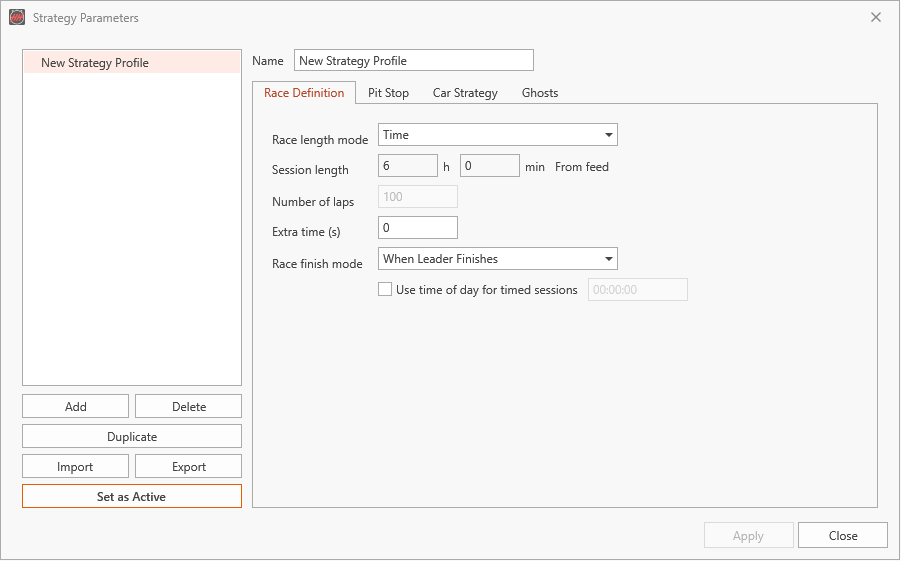
HH Timing V2 calculates with the active strategy profile. The first profile you create becomes active straight away. To switch to another profile, select it and click Apply and Activate or Set as Active.
- Race Definition: Race length mode (time or laps), the session length (taken from the timing feed when available), Extra time (s) and the Race finish mode.
- Pit Stop: the pit stop times used by the calculations.
- Car Strategy: the planned stints of each car.
- Ghosts: the ghost cars shown in the displays.
Add, Duplicate, Import and Export work as for the other profiles; Apply saves the changes.
The active strategy profile cannot be deleted. Make another profile active first.
See Profiles for how profiles, the active profile and the status bar work, and Calculations for how the race finish is calculated.